A modern web supervisor for a Desigo Insight site
RMBI Care Co. needed a modern, easy-to-use supervisor without disturbing the controllers that keep the home comfortable. This puts Syscom’s tried and tested Niagara N4 upgrade to work: the existing Siemens PX controllers stay in place, and staff get a clean, browser-based view of every floor, plant room and weather-driven window control.
-
Project Location
Croydon
-
Client
RMBI Care Co.
-
Project Type
BMS Supervisor Upgrade
-
Service
Controls Integration
Scope of works
RMBI Care Co. runs a residential care home where comfort and reliable plant matter every hour of the day. The building was supervised by Siemens Desigo Insight, a desktop client that had served the site well for years but was showing its age. The home needed a current, easy-to-use supervisor that could keep talking to the existing Siemens PX controllers, with room control, window automation and plant monitoring all carried across, and simple access to alarms and the weather.
The scope was to upgrade the supervisor to a Tridium Niagara N4 and rebuild the user interface as a modern dashboard, without disturbing the controllers that run the building day to day. The supervisor’s physical PC and hardware were upgraded as part of the project, and Syscom can now provide secure remote support, so issues can be diagnosed and resolved without a site visit.
Existing controllers kept
The Siemens PX controllers stay in service over BACnet/IP, so nothing that works is ripped out.
A modern web supervisor
Tridium Niagara N4 in any browser, with 16 systems on one dashboard.
Room-by-room control
KNX RXB24.1 room controllers on a live table, 3D plan and per-room setpoint cards.
Live alarm handling
Alarms grouped by class and acknowledged in one click.
Weather-driven windows
Wind, rain and temperature data drive window closing, night cooling and trickle vents.
Occupancy at a glance
Each floor shows its temperature range, occupancy and next scheduled change.
Window cleaning mode
A one-toggle safe state for each zone, so cleaning is quick and easy.
Hardware and remote support
Upgraded supervisor PC and hardware, with secure remote support from Syscom.
Proof of works
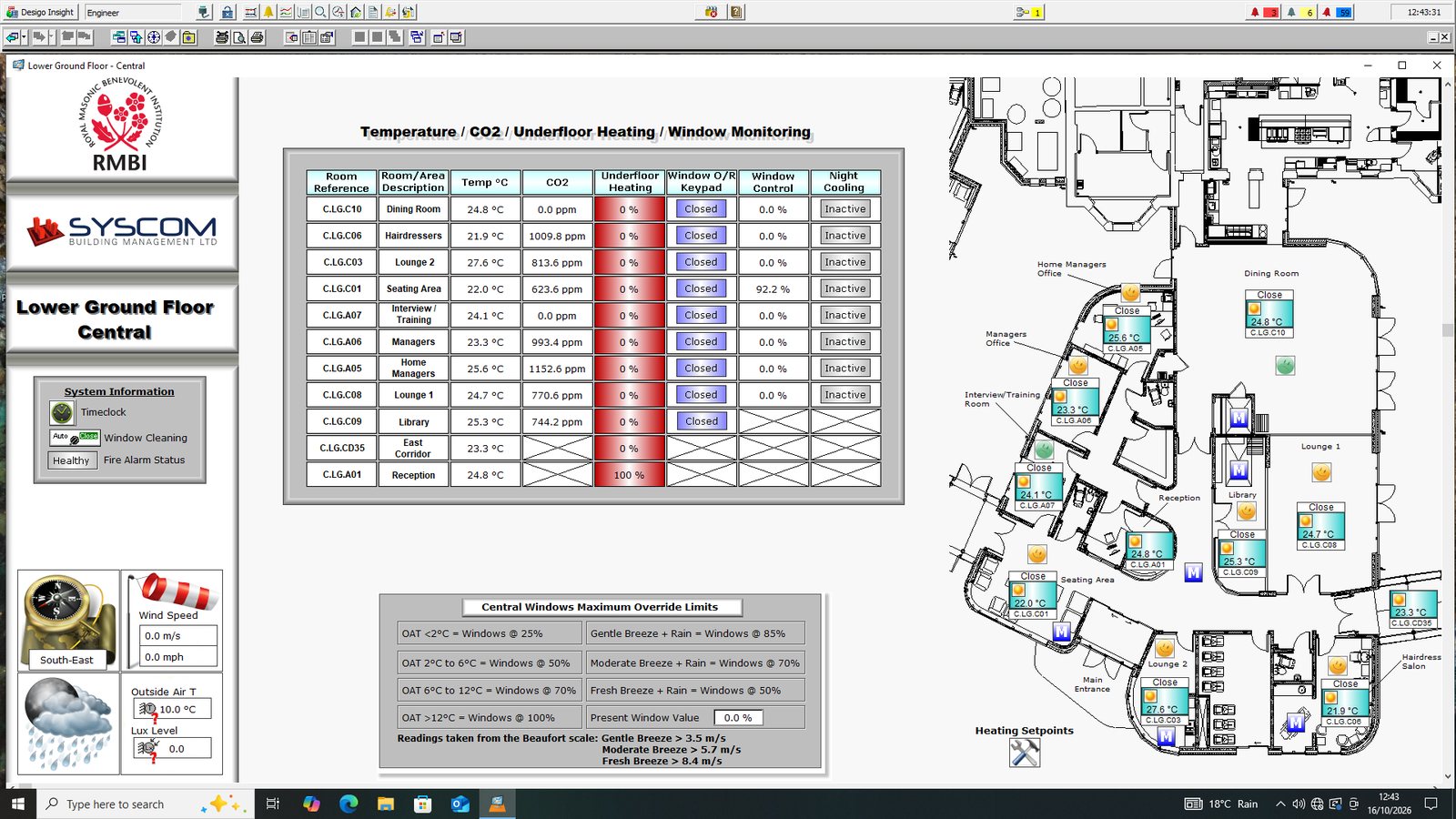
The old supervisor presented fixed graphics in a desktop application. The new one presents the same floor as a live, browser-based dashboard with a 3D plan, clearer alarms and weather-aware controls, all shaped around how the RMBI team already works. Below, the starting point is shown beside the finished upgrade.
Both screens show live site data.
| Where we started | Where we ended | |
|---|---|---|
| Supervisor | Siemens Desigo Insight desktop client | Tridium Niagara N4 Supervisor in a web browser |
| Controller link | LON/BACnet to Siemens PX controllers | Same PX controllers, pulled in over BACnet/IP |
| Room control | Room data on a fixed table and 2D plan | KNX RXB24.1 room controllers on a live table, 3D plan and per-room setpoint cards |
| Alarms | Alarm counts in the toolbar | Critical, Warning, General and History views with acknowledge and sorting |
Alarms: the same job, a clearer view
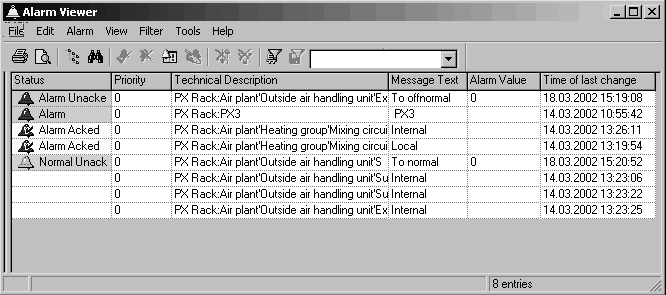
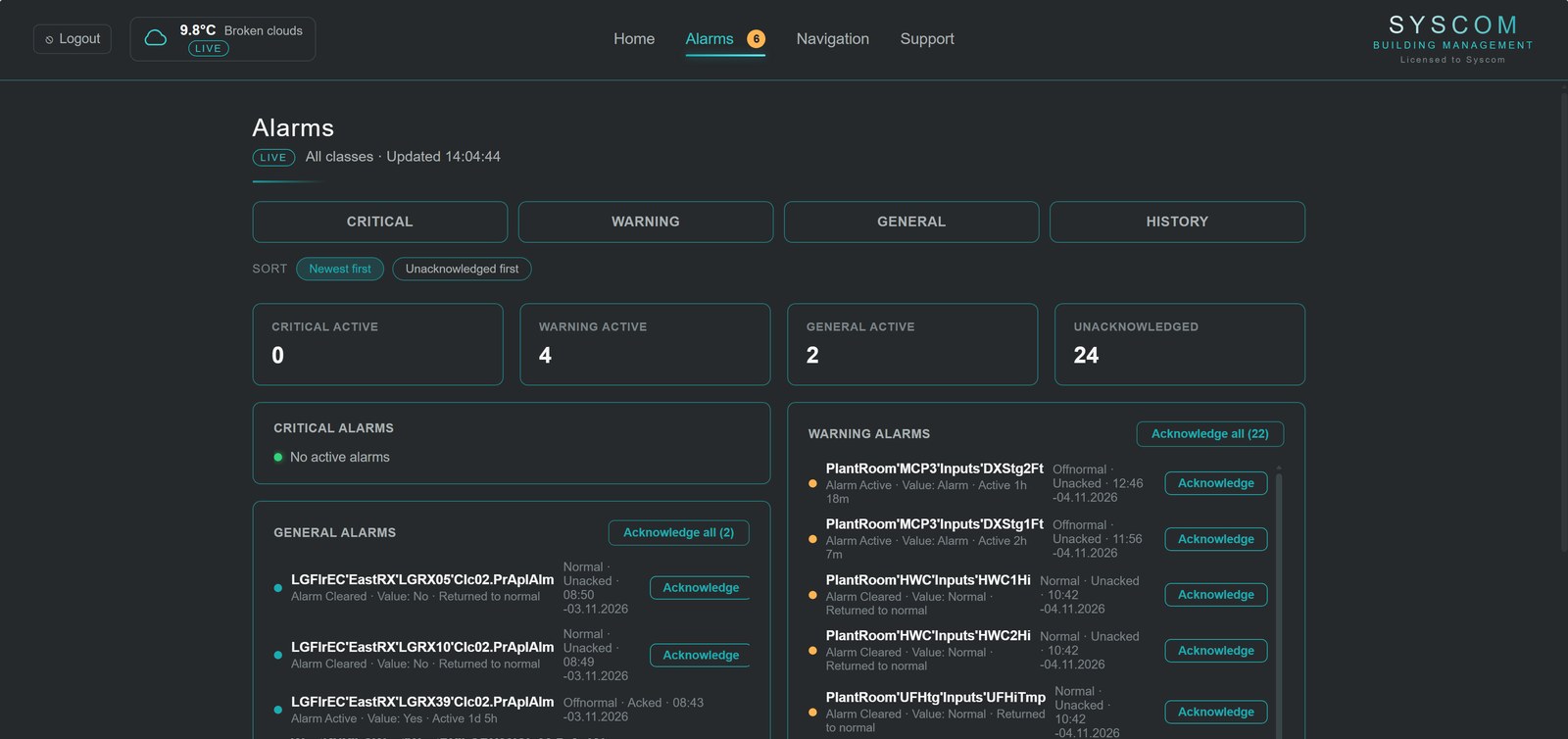
Alarm handling is where operators spend most of their time, so it was a priority to get right. The old Alarm Viewer shows every alarm in one flat list. The new page groups them by class and puts the actions next to each alarm, so the team can see what needs attention and deal with it straight away.
Desigo Insight Alarm Viewer: one flat list, small status icons and long descriptions cut off at the column edge.
| Desigo Insight Alarm Viewer | Niagara N4 alarms page | |
|---|---|---|
| Layout | One table of all alarms in a desktop window | Separate Critical, Warning and General panels, plus a History view |
| At a glance | Entry count in the status bar | Live counts for critical, warning, general and unacknowledged alarms |
| Status | Small icons in the Status column | Coloured markers with plain-text state, such as Alarm Active or Returned to normal |
| Acknowledging | Toolbar and menu commands | An Acknowledge button on each alarm and an Acknowledge all button per class |
| Sorting | Column headings and filters | Newest first or unacknowledged first in one click |
| Reading long names | Descriptions are cut off at the column width | Full alarm names wrap onto the next line |
| Where it runs | Desktop client | Any web browser |
What we delivered
Room-by-room comfort control
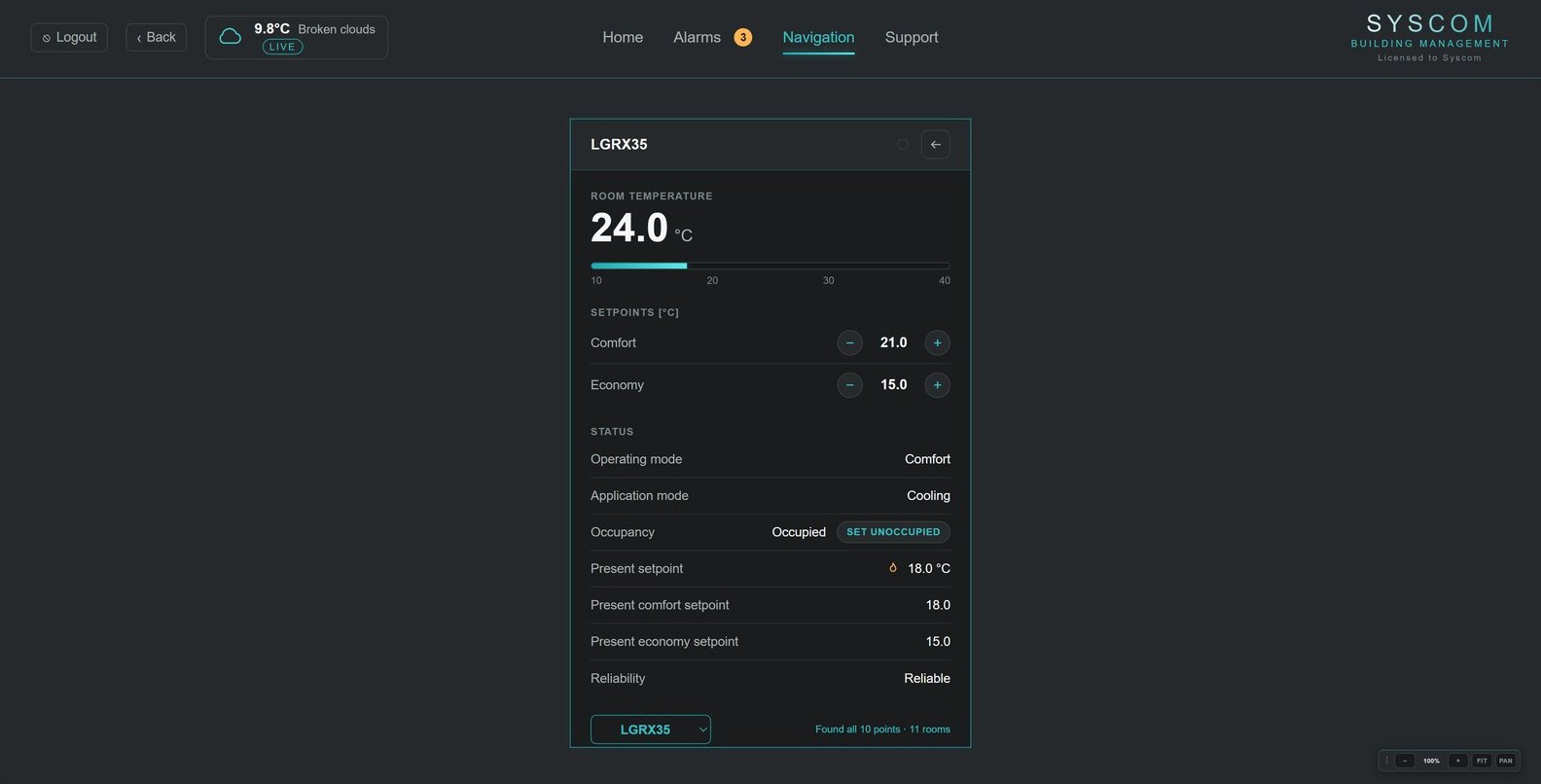
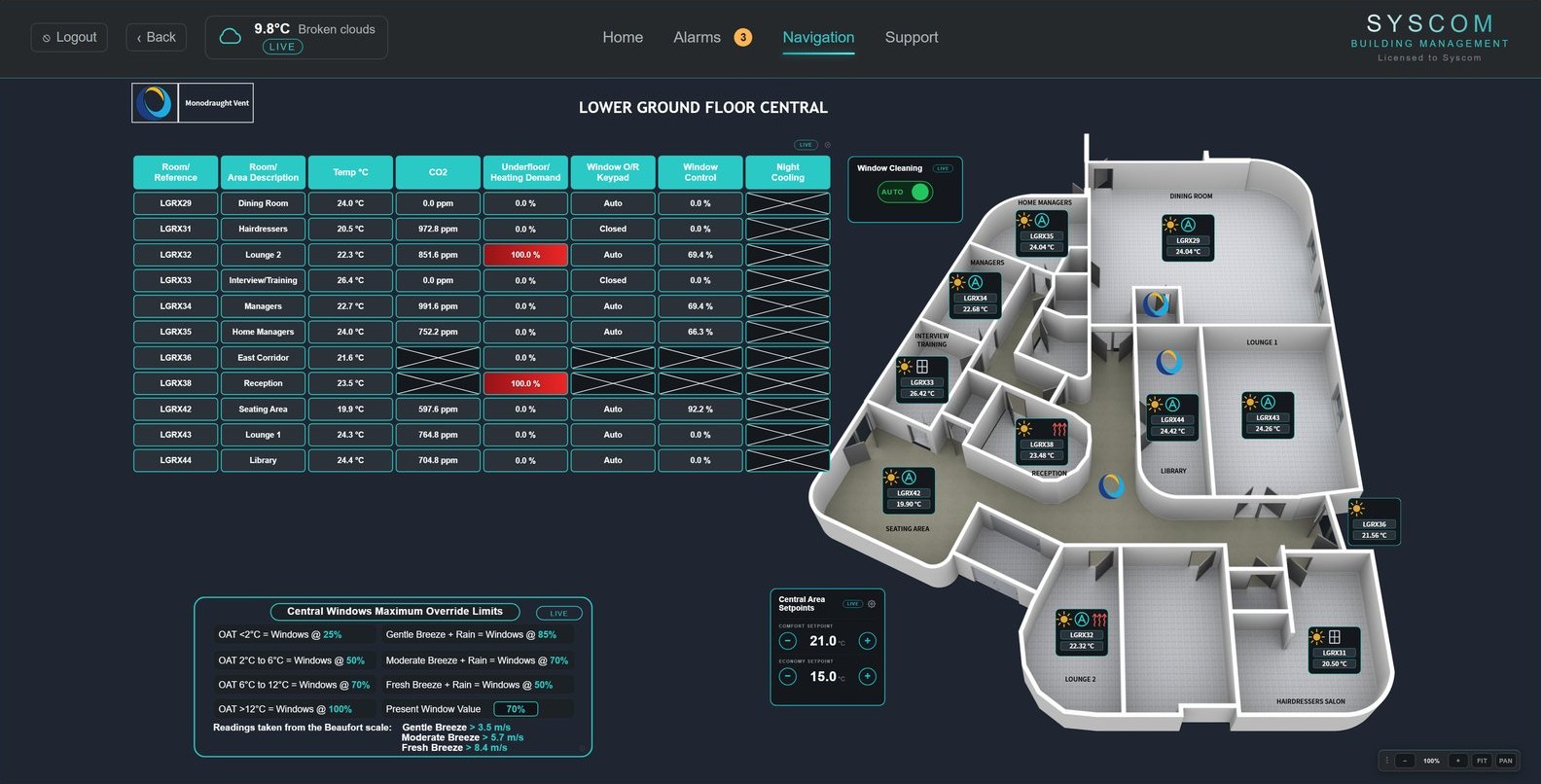
Each KNX RXB24.1 room controller feeds a live table and 3D floor plan showing temperature, CO2, heating demand and window position. Staff can open any room to adjust the comfort and economy setpoints or set it unoccupied.
Weather-driven windows and ventilation
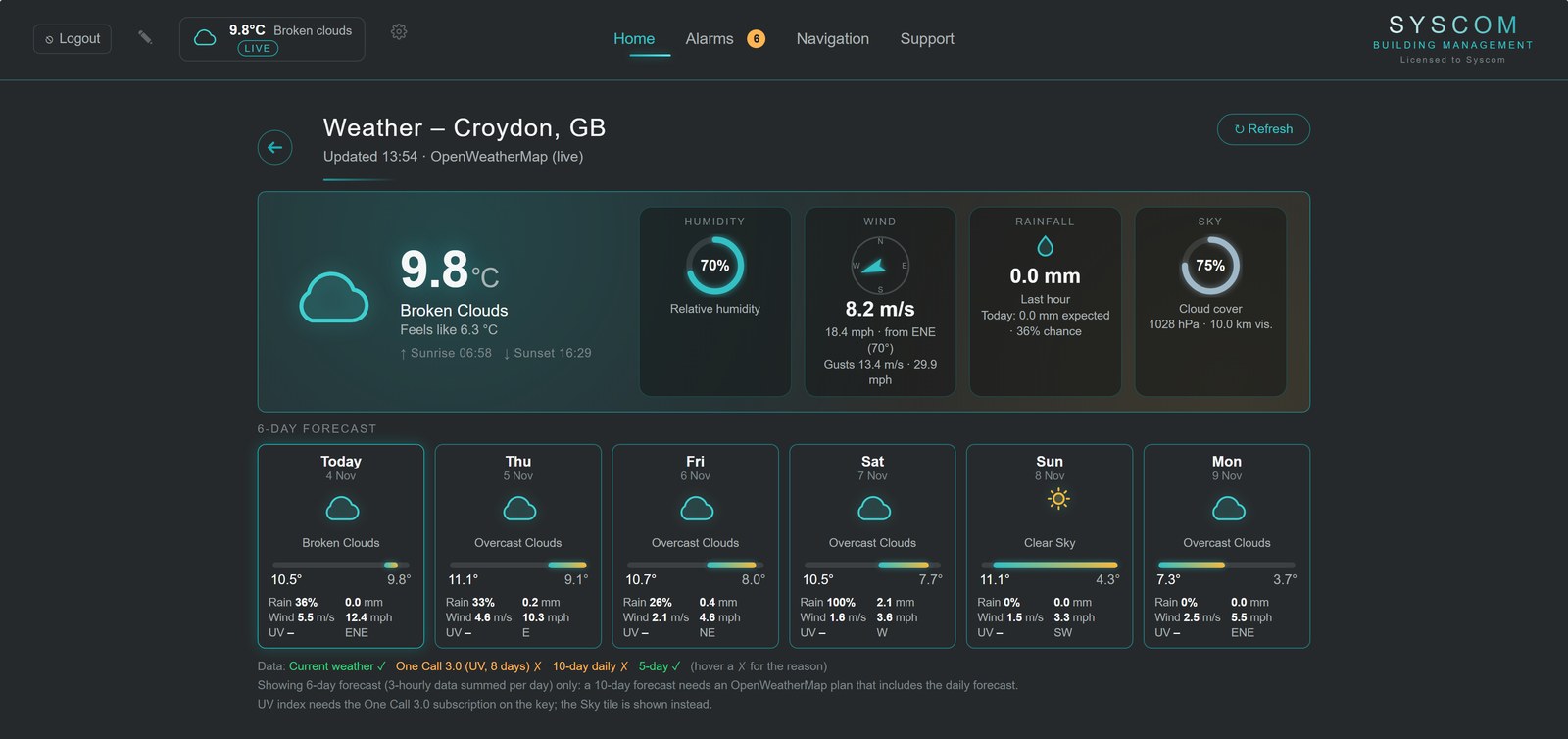
A weather station reports wind speed, wind direction and rain. When certain conditions are met the windows close, and the same station drives night cooling and the trickle vents. Staff can also see the live conditions and a 6-day forecast on the weather page, so they know what is coming before the windows react.
Window cleaning mode
Each zone has its own window cleaning switch, so cleaners can put the windows into a safe state with one toggle. It makes cleaning the windows quick and easy.
Every floor and its occupancy at a glance
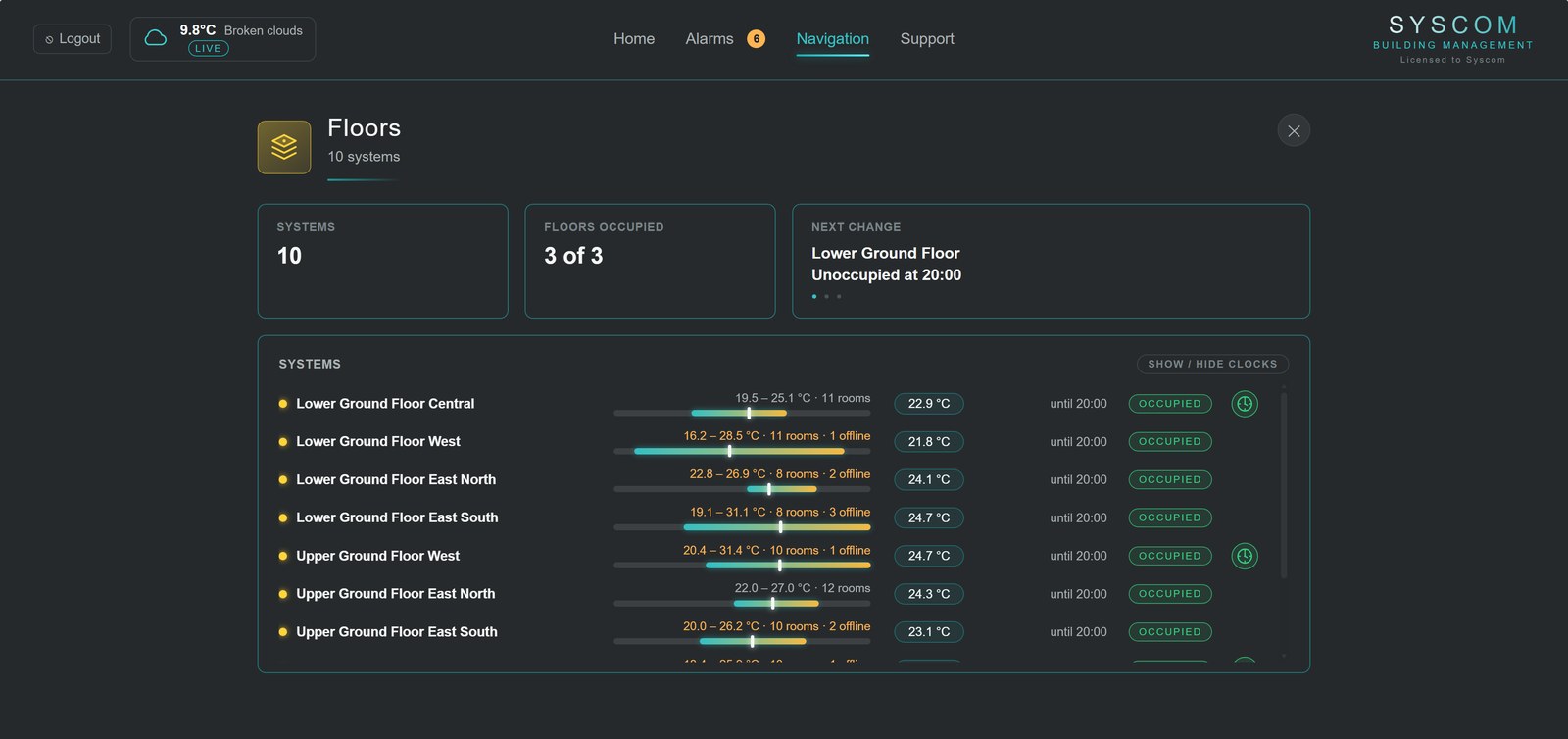
The Floors page lists every system with its temperature range, average temperature, occupancy state and the time of the next change. A thin bar shows how spread out the rooms are, so a warm or cold room stands out immediately, and rooms that have lost communication are flagged as offline.
Schedules you can read at a glance
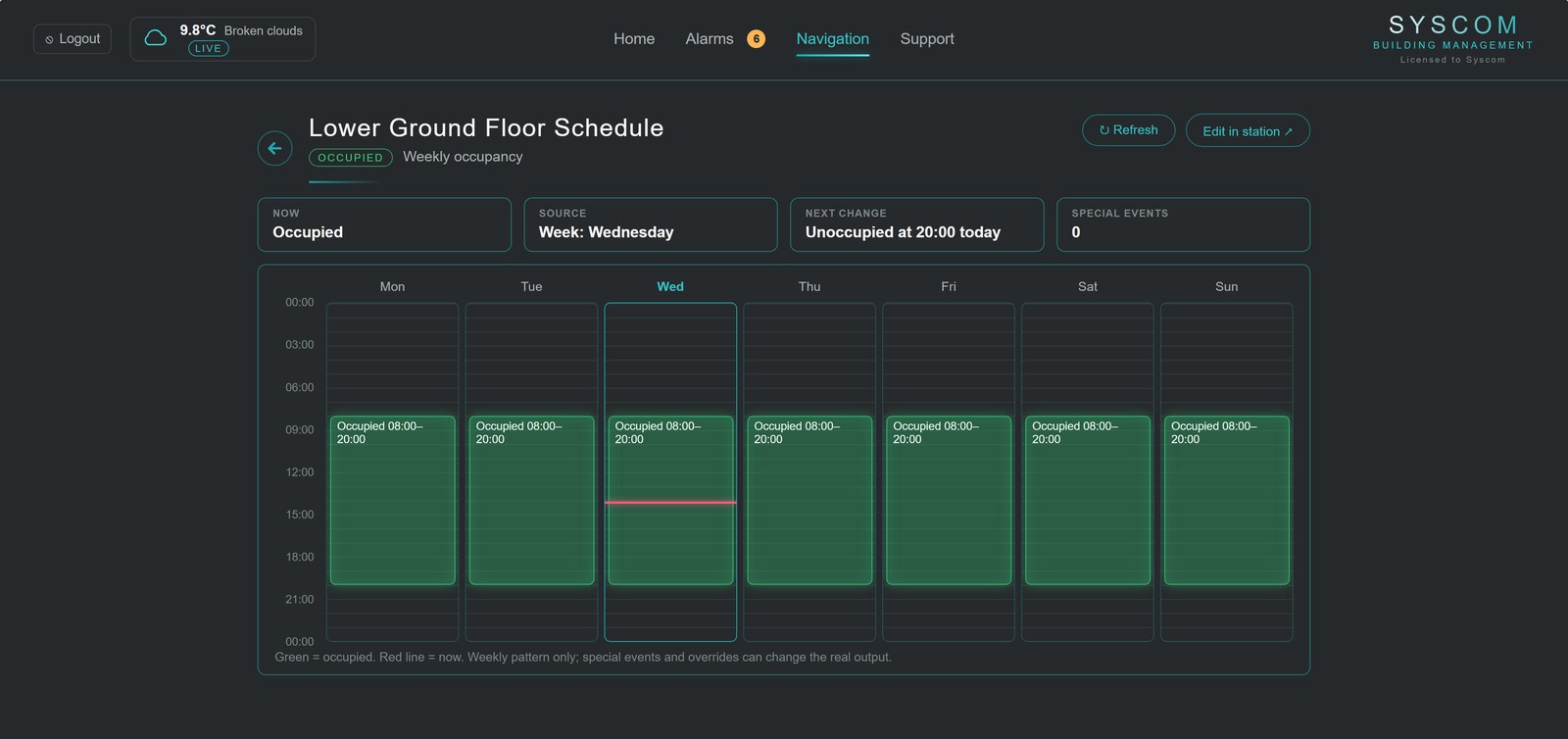
Each floor has its own weekly schedule view. Occupied periods are shown in green with a red line for the current time, and the cards above confirm the current state, which day’s schedule is in use and when the next change happens. Staff can read the pattern without opening the controller, and an Edit in station button takes engineers straight to the schedule when a change is needed.
Live alarm handling
Alarms are split into Critical, Warning and General classes, each with its own live count, plus a History view. Alarms can be sorted newest first or unacknowledged first, and acknowledged one at a time or per class in a single click. Each entry shows its state, how long it has been active and when it was raised.
How we delivered it
Six steps took the brief from handover to a live, supported system.
Project handover
We captured the existing Desigo Insight graphics, points and control logic, so every engineer started from the same picture.
Niagara N4 build
The N4 dashboard was built, with the PX controllers connected over BACnet/IP.
Behaviour checks
Room, window and alarm behaviour was checked against the old system, so everything works as it did before.
Client walkthrough
The dashboard was walked through with the RMBI team, screen by screen.
Hardware and remote access
The supervisor PC and hardware were upgraded, and secure remote support was set up for Syscom.
Sign-off and go-live
The upgrade went live and moved into Syscom 24-hour support.
The team that delivered it
The people who delivered the upgrade for RMBI Care Co.: project management, technical leadership and engineering, and fresh thinking on the graphics.
Robert Treleaven
Successfully coordinated the graphics upgrade project, showcasing the new Web Graphics. He maintained project momentum, managed progress proactively and kept communication with the client clear and consistent throughout every stage of delivery.
Stefan Salmon
Led the technical side of the upgrade. His deep experience with Siemens and Niagara systems shaped the approach from the start, and he made sure every controller, room and window routine worked as it did before. His oversight is why the changeover ran smoothly.
Connor Duncan
Brought fresh thinking to the project and kept pushing the graphics further than the old setup had gone. He supported Stefan wherever he was needed, and helped deliver a modern interface the RMBI team can pick up straight away.
What RMBI can see
One browser-based view of every floor, plant room and weather-driven window routine. RMBI keeps its proven PX and KNX controllers, and gains a modern web interface, upgraded supervisor hardware and smarter weather-based window control, without ripping out what already works.
Alarms are clearer, rooms are easier to adjust and help is never far away, with 24-hour Syscom support including remote support.
Modernise your building management system
This is Syscom’s tried and tested approach to Niagara N4 supervisor upgrades: your existing controllers retained, operational visibility improved and 24-hour support behind you. Tell us about your building and we will show you what an upgrade would look like.